
How Visual Learning Helps Explain Complex Topics


Some topics are difficult to understand not because the learner lacks ability, but because the information is presented in a format that makes it hard to process.
A dense research paper, technical manual, textbook chapter, or training document may contain everything someone needs to know. Yet long paragraphs, unfamiliar terminology, abstract concepts, and complicated processes can make the material difficult to follow.
This is where visual learning can help.
By presenting information through diagrams, illustrations, sequences, and other visual formats, complex ideas can become easier to organize and understand.
Why Complex Information Is Hard to Process
When people encounter a difficult subject, they often have to understand several things at the same time.
They may need to remember terminology, follow a sequence of events, recognize relationships between concepts, and understand how different parts of a system work together.
Written material can explain all of this in detail, but text alone does not always make those relationships immediately clear.
For example, it may be difficult to understand a multi-step process by reading several paragraphs describing each stage. A visual flow showing those stages in order can provide context much faster.
The challenge becomes even greater when documents are long.
Learners may lose track of earlier information, miss important relationships between ideas, or become overwhelmed by the amount of material they need to process.
How Visual Learning Makes Complex Topics Clearer
Visual learning does not mean removing important detail. Instead, it provides another way to organize and present that detail.
A well-designed visual explanation can help by:
Showing relationships between concepts
Breaking processes into clear stages
Highlighting important information
Giving abstract ideas a more concrete form
Creating a logical sequence for the learner to follow
Reducing the amount of information presented at once
Consider a scientific process with six different stages. A written explanation may require several paragraphs. A visual sequence can show how one stage leads to the next while still providing supporting explanations.
The same principle applies to business processes, historical events, technical systems, research findings, training procedures, and educational material.
Combining Visuals With Video
Video can take visual learning one step further because information can be presented progressively.
Instead of showing an entire complex diagram at once, a video can introduce each concept or stage in sequence.
This can be especially useful when explaining:
Processes and workflows
Scientific concepts
Historical timelines
Technical systems
Training procedures
Research findings
Cause-and-effect relationships
The viewer can follow the explanation in the order it is intended to be understood.
However, creating these videos manually can require scriptwriting, illustration, scene planning, animation, and video editing.
That can make visual learning content difficult to produce at scale.
Turning Existing Documents Into Visual Explanations How Visual Learning Helps Explain Complex Topics
In many cases, the information needed for a visual explanation already exists.
It may be inside a textbook, training manual, research paper, course document, or PDF report. How Visual Learning Helps Explain Complex Topics
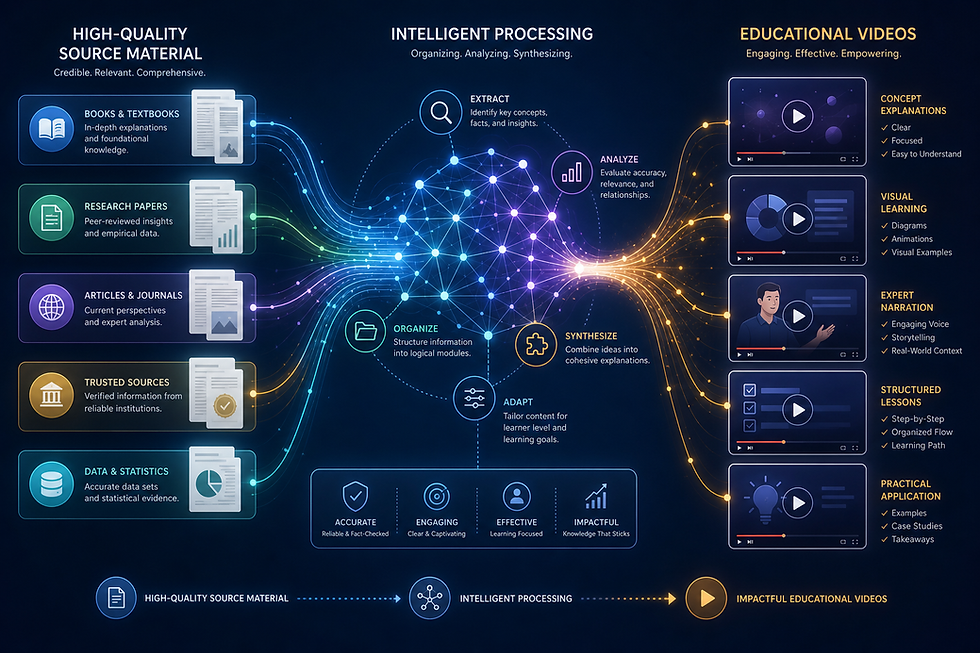
Instead of recreating that material from the beginning, AI tools can use the existing document as the foundation for a video.
Explisera is designed specifically for this workflow.
Users can upload a text-based PDF, choose a visual direction, and generate a structured AI video based on the source material.
Choosing the Right Visual Style
Different subjects benefit from different types of visuals.
A business process may be easier to understand with a process-flow diagram. A classroom lesson might work well with a whiteboard-style explanation. Historical content may benefit from a visual direction that matches the period or subject.
Explisera's Standard+ plan includes more than 72 visual styles, including options such as:
Whiteboard-style explainers
Process-flow diagrams
Minimalist illustrations
Paper-cutout visuals
Historical-inspired presentations
Manga-inspired scenes
This allows the presentation style to support the subject rather than forcing every topic into the same visual format.
Where Visual Learning Can Be Useful
Visual explanations can support many different audiences.
Students can use them alongside textbooks and lecture notes when reviewing difficult topics.
Teachers can transform existing learning material into an additional format for lessons and revision.
Training teams can present procedures and internal documentation in a more visual way.
Researchers and professionals can make complex papers and reports easier to communicate to broader audiences.
The goal is not necessarily to replace written material. In many situations, the strongest approach is to use visual content alongside the original document.
How Explisera Supports Visual Learning
Explisera focuses on simplifying the process of turning existing PDF material into visual videos.
Its features include:
PDF-to-video generation
AI-generated video scenes
Support for textbooks, manuals, course notes, research papers, and training documents
More than 72 visual styles with Standard+
Support for longer PDF projects on Standard+
Higher generation capacity for paid users
Priority generation on Standard+
A free plan with no credit card required to start
This makes it possible to experiment with different ways of presenting complex material without needing traditional video production skills.
Make Complex Information Easier to Follow
Complex topics often become easier when learners can see how the information fits together.
Text provides detail, while visuals can reveal structure, sequence, and relationships.
By combining the two, educators, trainers, researchers, and content creators can present difficult ideas in a way that is easier to follow.
With Explisera, existing documents can become the starting point for those visual explanations, helping turn dense written material into structured videos that give audiences another way to understand the subject.


Comments