
Explisera: A Simpler Way to Turn PDFs Into Videos
- Kateryna Myrko
- 6 hours ago
- 5 min read

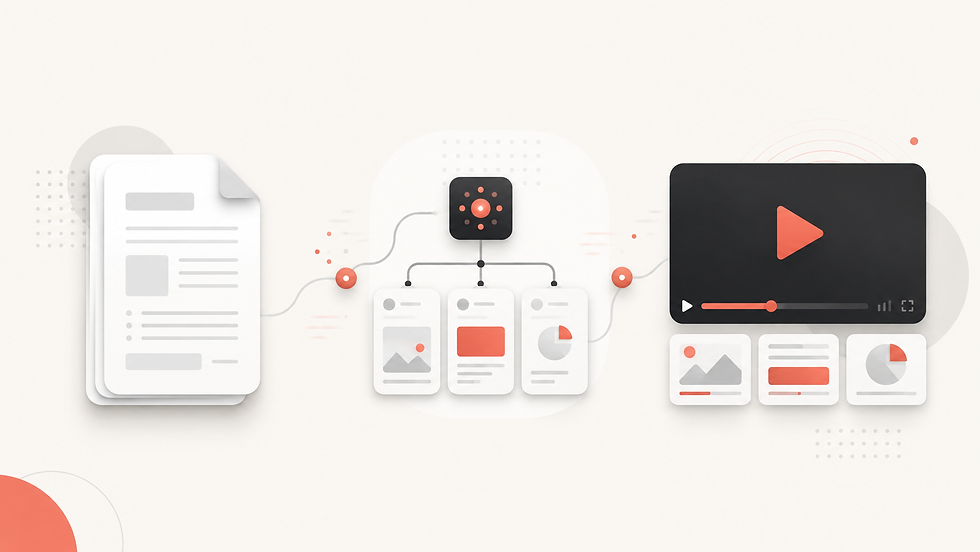
PDFs are one of the most common ways to share information. Textbooks, training manuals, research papers, course notes, internal documentation, and reports are often distributed as PDFs because they are easy to create and consistent across devices.
The problem is that PDFs are not always easy to consume.
Long documents can demand significant time and concentration, especially when the subject is technical or unfamiliar. Important ideas can become buried inside pages of text, while readers may struggle to understand how different concepts connect.
Video offers another way to present the same information. Visual explanations, structured scenes, narration, and motion can make complex material easier to follow.
But creating a video from a document traditionally requires a completely different workflow. Someone has to read the PDF, identify the important information, write a script, plan scenes, create visuals, record narration, edit the video, and prepare the final output.
Explisera is designed to simplify that entire process.
What Is Explisera?
Explisera is an AI-powered PDF-to-video platform that turns document-based content into structured visual videos.
Instead of starting with a blank video editor, users start with material they already have.
Upload a PDF, choose a visual direction, and let Explisera transform the source material into a cohesive video.
The platform is designed for documents such as:
textbooks;
course notes;
educational PDFs;
training documents;
employee manuals;
onboarding material;
research papers;
reports;
technical documentation; and
other text-based PDFs.
The goal is simple: make useful information contained in documents easier to watch, explain, and share.
A Simpler PDF-to-Video Workflow
Traditional video production involves many separate steps and tools. Explisera brings the process into a much simpler workflow.
1. Upload Your PDF
The process begins with the source document.
Instead of manually copying information into scripts or presentation slides, you upload the PDF directly to Explisera.
The platform can analyze the document and use its content as the foundation for the video.
This is especially useful when working with large documents because the creator does not have to rebuild the source material from the beginning.
2. Choose a Visual Style
Different subjects require different visual approaches.
A corporate onboarding manual may need a clean and structured presentation, while an educational topic may benefit from more expressive illustrations and visual storytelling.
Explisera includes 72+ visual styles, allowing users to select a direction that fits the material.
This gives creators more control over the personality and presentation of the final video without requiring advanced design skills.
3. Generate the Video
Once the document and visual direction are selected, Explisera turns the source material into a structured video experience.
The generation process can involve elements such as:
content analysis;
script development;
scene organization;
visual generation;
narration or audio;
video generation; and
consistent visual presentation across scenes.
Instead of coordinating several separate production tools, the workflow remains focused around the original document.
Why Turn PDFs Into Videos?
The purpose of PDF-to-video AI is not necessarily to replace documents.
Documents remain useful when someone needs detailed reference material, precise wording, citations, tables, or information they can scan manually.
Video serves a different purpose.
A well-structured video can help explain the main ideas of a document in a format that is easier to follow from beginning to end.
For education, this can turn dense reading material into a visual learning resource.
For businesses, it can make onboarding and training documents more approachable.
For research, it can help communicate the key ideas of a long paper or report without requiring every viewer to begin by reading the complete document.
Explisera makes it possible to use both formats together: the PDF remains the detailed source while the video becomes a more accessible way to present its content.
Explisera for Education
Educational material is often information-rich but visually limited.
Students may receive textbooks, lecture notes, revision documents, or course PDFs containing everything they need to learn, yet understanding the material can still take considerable effort.
Explisera can transform this content into educational videos based on the original PDF.
Visual scenes can help break large topics into smaller sections, while video provides a natural sequence for explaining concepts.
Teachers, course creators, and learners can therefore repurpose existing educational
documents instead of recreating lessons from scratch.
Explisera for Training and Onboarding
Companies already possess enormous amounts of useful training content.
The challenge is often not creating the information but getting employees to consume it.
Policies, standard operating procedures, onboarding guides, product documentation, and training manuals can quickly become long documents that employees are expected to work through independently.
Explisera provides another way to use that existing material.
A training PDF can become a visual video that guides viewers through the important information in a more structured format.
This can be particularly helpful when businesses want to reuse documentation they have already invested time in creating.
Explisera for Research and Reports
Research papers and professional reports frequently contain valuable ideas that are difficult to communicate to a wider audience.
Technical terminology, methodology, long explanations, and dense paragraphs can make research less accessible to people outside the immediate field.
Turning a research paper into a video can create an additional communication format.
Explisera can use the document as the source and transform its material into scenes and visual explanations that are easier to present, review, or share.
The original paper remains available for detailed reading, while the video provides another way to engage with its ideas.
The Benefits of Using Explisera
One of Explisera's biggest advantages is that it starts with content users already have.
You do not need to begin with an empty timeline or manually build every scene.
The platform helps reduce the distance between having information and presenting that information visually.
Key advantages include:
a straightforward PDF-to-video workflow;
AI-assisted processing of document content;
72+ visual styles;
support for educational, business, research, and training material;
reduced need for manual scripting and scene planning;
visual consistency across the generated video;
support for long-form document repurposing; and
a workflow that does not require advanced video-editing experience.
A Different Way to Use the Content You Already Have Explisera, A Simpler Way to Turn PDFs Into Videos
Many organizations, educators, researchers, and creators do not have a shortage of content.
They have a presentation problem. Explisera, A Simpler Way to Turn PDFs Into Videos
The valuable information already exists inside PDFs, manuals, textbooks, reports, and notes. The challenge is turning that information into something people can consume in another format without rebuilding everything manually.
That is where Explisera fits.
By combining PDF processing, AI video generation, structured scenes, and flexible visual styles, Explisera offers a simpler path from document to video.
Instead of asking, “How do I create a video from scratch?” the starting point becomes much easier:
Choose the PDF that already contains what you want to explain.
Comments